You can now move people in photos
Removing someone from the middle of a group photo usually leaves an awkward gap that an eraser has to invent a background for. Removex now lets you slide the people who are left closer together — so the shot looks like it was always just the two of you.
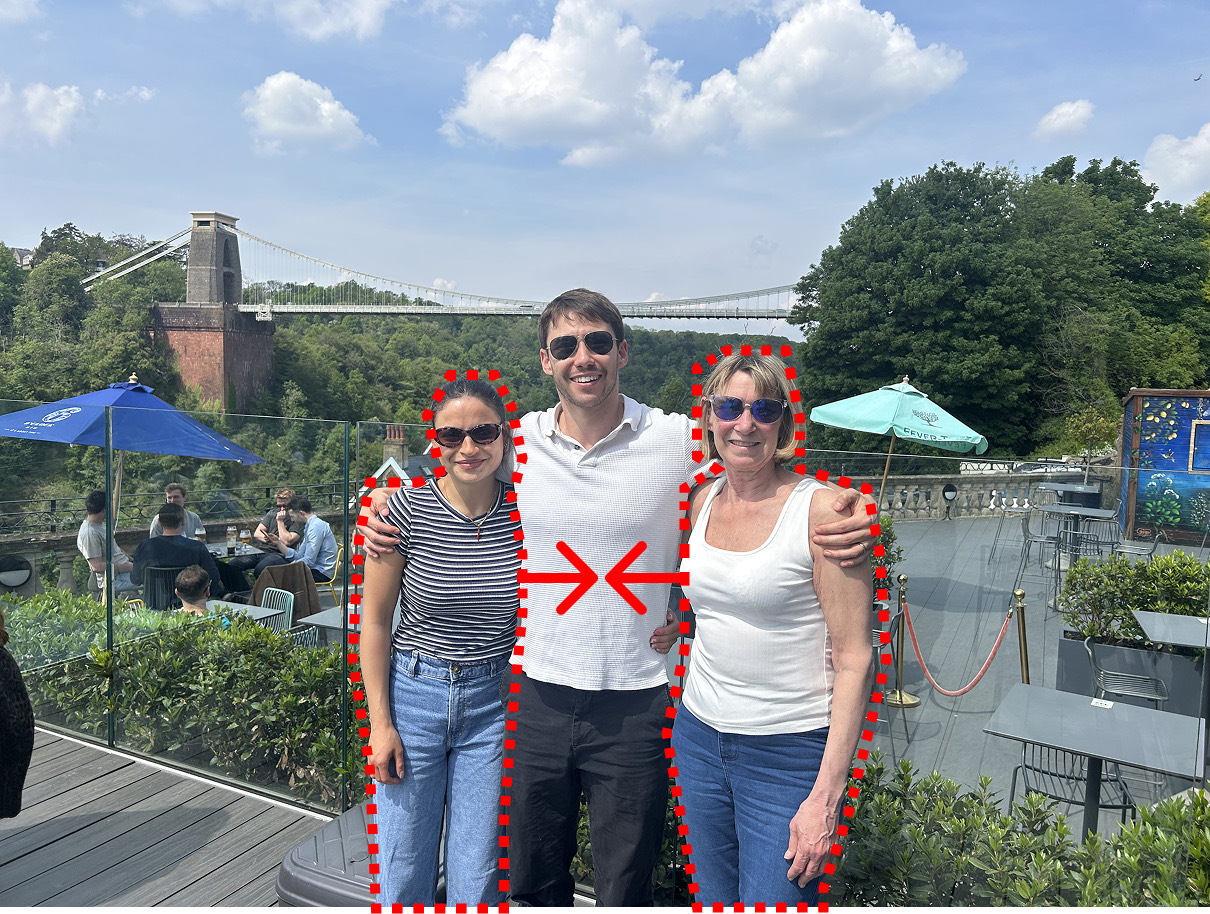

Why removing someone from the middle is hard
Erasing a stranger at the edge of a photo is easy — there's grass or sky or wall behind them, and any tool can paint that back in. The hard case is when the person you want gone is standing in the middle of the group, with your friends pressed up on either side.
Delete them and you're left with a person-shaped hole in the centre of the shot. A normal eraser then has to hallucinate a chunk of background to fill it — often a smeared, obviously-fake patch right where everyone's looking. And you still have two people awkwardly spaced apart, with a suspicious gap between them.
Removex moves the people who are left
Instead of inventing a big fake background, Removex lets you move the remaining people together. Remove the person in the middle, then slide your friends toward each other until they're standing side by side — the way the photo probably should have been taken. There's far less background to reconstruct, so what's left looks real, and the composition tightens up into a proper two-shot.
This is genuinely different from what Apple's Clean Up tool or a typical object eraser can do. Those can only delete and fill — they can't reposition the subjects that stay. Removex is built specifically for people, so it can both remove someone and rearrange the group.
How to do it, step by step
- Open the group photoLaunch Removex and pick the group shot you want to fix.
- Remove the personTap the person in the middle. Removex detects the whole subject in one tap — no tracing — and removes them.
- Move the others togetherDrag the people on either side toward each other to close the gap where the removed person was standing.
- Save at full qualityRemovex reconstructs the background at the original resolution and saves the clean photo straight back to your library.
When this is a lifesaver
- An ex in the middle of a favourite photo. Keep the shot of you and your friend, remove the third person, and close the space so it doesn't look edited.
- A photobomber wedged into the group. Remove them and pull everyone back together.
- Someone who had to leave the frame. Turn a three-person shot that never quite worked into a clean two-shot.
- Tightening a loose group photo. Even without removing anyone, nudging people together can rescue an awkwardly spaced picture.
Try it on your own group photo
Free to download. Works on iPhone, iOS 17.6 or later.
Download RemovexRelated: Apple Clean Up vs Removex · Can my iPhone remove people from photos?